I'm adding this post to remind myself of all the tools I use and need on any dev environment I setup ever. There are so many useful things, and they're easy to forget. Then, you spend 20 minutes hunting them down again when you need them.
Of course, this list is sparse right now because I can't remember all the tools I use...
Bash:
https://coderwall.com/p/oqtj8w
Wednesday, April 17, 2013


Sunday, March 31, 2013
Why I hate JavaScript.
Okay, I feel like I should elaborate on why I hate JavaScript, so THIS post is going to be a collection of JavaScript failures from around the net. True, you may say that they're the result of poor programmers writing bugs, but I'm going to do my best to show examples where it's probably not the programmer's fault.
CASE ONE: DUO LINGO

CASE ONE: DUO LINGO
Duo Lingo is pretty good. Certainly, it seems to be well coded (though, in all fairness, it's not excessively complicated client-side). Howerver, sometimes it fails, and when it fails, it fails hard. Here's a screen where the user is supposed to type what is spoken. Unfortunately, it doesn't play anything. Not even when you click the button. Why is this? I think maybe it's because JS is terrible and the code to play the sound may have failed to load in one way or another.
Here's how to continue on despite this setback, if you're interested. In Chrome, right-click the speaker button (#1 in the picture) and select "Inspect element" (In other browsers, you're going to have to find the code for the speaker button. You should just have to view > source and search for "speaker-audio"). This will pop up the panel above. Then, right-click the link (#2 in the picture) and select "open link in new tab" (on other browsers, copy and paste this link into a new tab).
And voilà (I just looked up how to spell that... I'm learning Spanish, not French...)! There you have it. The sound is there. The link is in the code. The button exists.
JavaScript sucks.
Wednesday, March 27, 2013
I hate JavaScript.
JavaScript is bad. AWFUL. If you don't believe me, pick up any book, watch any video, read any tutorial on learning JavaScript and wade through the intro that apologizes for all the bad parts of JS. Even one of the most recommended books for learning JS clarifies that it's about "the good parts."
Unfortunately, as they say "it's the language of the internet." Eventually, we all come in contact with it, whether we want to or not. I'm just making this post to link to all the resources I find that help make sense of the world's most prevalent and terrible language.
JavaScript:
Getting Started (the good parts): http://amzn.com/0596517742
Evangelist: http://yuiblog.com/crockford/
Detecting null/undefined/non-existent: http://lisazhou.wordpress.com/2008/06/17/javascript-detect-null-object/
Popular JS Frameworks:
http://backbonejs.org/
http://marionettejs.com/
http://handlebarsjs.com/
http://twitter.github.com/bootstrap/
http://jquery.com/
http://jqueryui.com/
http://meteor.com/
http://angularjs.org/
http://emberjs.com/
http://embeddedjs.com/
http://expressjs.com/
http://meteor.com/
CSS:
Style Inheritance: http://www.vanseodesign.com/css/css-specificity-inheritance-cascaade/
Style Reset (remove browser defaults): http://meyerweb.com/eric/thoughts/2007/05/01/reset-reloaded/
SASS (better way of writing CSS): http://sass-lang.com/
Compass: http://compass-style.org/
Additional Tools:
Server-side JS: http://nodejs.org/
Grunt Task Runner: http://gruntjs.com/
NPM (Node Package Manager): https://npmjs.org/
Underscore JS library: http://underscorejs.org/
Wrapping it all together with Yeoman: http://yeoman.io/
Angular Tutorials: http://egghead.io/
Angular with Express and Node: http://briantford.com/blog/angular-express.htm
Full Stack for Node: http://towerjs.org/
Additional Info:
Video and Book about Single Page Web Applications: http://www.youtube.com/watch?v=OrIFaWJ9Glo
Unfortunately, as they say "it's the language of the internet." Eventually, we all come in contact with it, whether we want to or not. I'm just making this post to link to all the resources I find that help make sense of the world's most prevalent and terrible language.
JavaScript:
Getting Started (the good parts): http://amzn.com/0596517742
Evangelist: http://yuiblog.com/crockford/
Detecting null/undefined/non-existent: http://lisazhou.wordpress.com/2008/06/17/javascript-detect-null-object/
Popular JS Frameworks:
http://backbonejs.org/
http://marionettejs.com/
http://handlebarsjs.com/
http://twitter.github.com/bootstrap/
http://jquery.com/
http://jqueryui.com/
http://meteor.com/
http://angularjs.org/
http://emberjs.com/
http://embeddedjs.com/
http://expressjs.com/
http://meteor.com/
CSS:
Style Inheritance: http://www.vanseodesign.com/css/css-specificity-inheritance-cascaade/
Style Reset (remove browser defaults): http://meyerweb.com/eric/thoughts/2007/05/01/reset-reloaded/
SASS (better way of writing CSS): http://sass-lang.com/
Compass: http://compass-style.org/
Additional Tools:
Server-side JS: http://nodejs.org/
Grunt Task Runner: http://gruntjs.com/
NPM (Node Package Manager): https://npmjs.org/
Underscore JS library: http://underscorejs.org/
Wrapping it all together with Yeoman: http://yeoman.io/
Angular Tutorials: http://egghead.io/
Angular with Express and Node: http://briantford.com/blog/angular-express.htm
Full Stack for Node: http://towerjs.org/
Additional Info:
Video and Book about Single Page Web Applications: http://www.youtube.com/watch?v=OrIFaWJ9Glo
Monday, February 25, 2013
New Site!
I'm not sure how best to transition this blog to my website or if I'm going to do that at all. But if you're here now, and wonder what I'm doing, then you might want to check out my site:

From now on, I will be updating that with my current apps. I still don't know how I'll link it and this blog, but I'll figure that out later.
Saturday, February 9, 2013
Star Panda - Delivered!


Click the above links to see the apps in Apple's App Store!

Wow, it's been about five months since my last app release....
At this point, making apps is not difficult, it's just very, very time consuming, and of course, life gets in the way. Between this app and the last, I learned quite a bit of Japanese and spent three weeks touring Japan.
Anyway, this latest app was made for my good friend Natalie. It was part of this pay-it-forward, craft-along thing. Eventually, I'll be making another app for another friend as a part of it. More on that later.
As for Star Panda, it's a fun little arcade game wherein you tour space attempting to collect cute animal friends and avoiding evil space bats and lizards.


Again, I was obsessed with a control scheme and made a game explicitly to explore it. The panda's controls are modeled after the super sheep in Worms Armageddon. I've always liked how learning to control them was an art in itself.

This was one of the most interesting releases I've had. I got denied by Apple because my app did not use Game Center. I had no idea they did that. Certainly, I've never heard of an app being denied for not supporting Game Center before. I ended up adding it in, which was exceedingly easy with Corona, but it was still a bummer having to wait another two weeks to release it.


I may start integrating Game Center into all my apps. At the very least, they won't get denied anymore for not having it.
Well, time to get back to work. I'm hoping to up my output this year, and those games aren't going to write themselves...
Sunday, September 30, 2012
The Last Thumb Fighter - Delivered!
Click the above links to see the apps in Apple's App Store!
I've finally completed my first mobile game, The Last Thumb Fighter! It has been seven months in the making. I should really spend more time writing apps...
Anyway, it's done, and instead of talking about what it is, I'm going to let you go check it out above. For those that are interested, I'm going to talk a bit about development.

It all began with a simple thought. That thought was, "Y'know, I love playing games with my friends, and there's no game that you could just pop out when you're hanging out at a bar and play with each other." Of course, there probably are some out there, but who has the time to search the app store for them?
So, that got me thinking about how you might play a game with your friends, and I stumbled upon this idea of holding the device between the two of you, each with one thumb on it. Everyone I described this two had the same feedback, "That would be awkward, and there's not enough room for it." And every time I got this feedback, I pulled out my iPod and made them hold it between us, and it just works.
That's gave birth to the idea, and shortly thereafter I began the prototype. The first iteration was just two circles shooting circles at each other. There was no game there, but the interaction just felt so right. You can judge for yourself whether or not the game's a success, but I think that regardless of how you feel about the overall product, you'll agree that interaction is successful.

From there, development went remarkably smoothly. I took the lessons of my last project into this and made a list of all the things I need to do, and one by one, I implemented each item and checked it off the list.
I hit a few stumbling blocks, from which I learned a few things, which I will share with you now.
1. Corona handles drawn images better than circles. With just a few newCircle calls, you can bring your app to its knees. Fortunately, there's an easy solution: draw your circles in your favorite paint program and use them instead. I recommend doing this early on because there are some subtle differences in how you handle the two, and it's no fun searching and replacing all the circles in your code.
2. Corona's button widgets are odd. They seem to be built for single interactions. You'll notice that before the co-op and multiplayer, you and your friend can select your ships at the same time. This created some funky bugs where the input bounced back and forth between simultaneously clicked buttons, resulting in the ship selections changing randomly. I ended up scrapping Corona's buttons in favor of my own. It turns out, my custom class was pretty easy to write. It's not as fully featured, but it gets the job done.

3. Sound is hard. There are definitely some little gotchas in implementing sound. Take a very careful look at how the samples work when you write your own. I actually learned much more about this when I created the update for Wizard's Magic Ball, but more on that later. However, what I'm really talking about is writing music. I haven't ever done that before, and I learned as much or more about sound than I did about everything else in this project. At some point, I'll have to do a post about how I write and record music.
4. Corona is remarkably easy to upgrade and well documented. No, this wasn't a stumbling block, but it helped me through several. I upgraded Corona once during this project when the New iPad came out, and there was a tiny change (for the better) to the button widget. That was the only thing I had to change. And throughout the project, I relied heavily on Corona documentation, which is fantastic. Great documentation can make up for many faults in an SDK.
And there you have it. There's so much more I could say about this project, but I'm not sure what would be useful or interesting to someone stumbling across this blog. I'm sure I'll be mentioning it often in the future (assuming I do more than a single blog post per release). If you've read this far and you have questions, fire away. I'd love to start a dialogue about indie game development.
P.S. I'm not one for taking away dev time to write blogs, but I have the upgrade to Wizard's Magic Ball and my adventures with other SDKs like Moai to talk about in the future, so barring any unforeseen laziness (or more likely, busyness making apps), look forward to posts about those in the future.
Saturday, September 29, 2012
Wizard's Magic Ball 2.0 - Delivered!
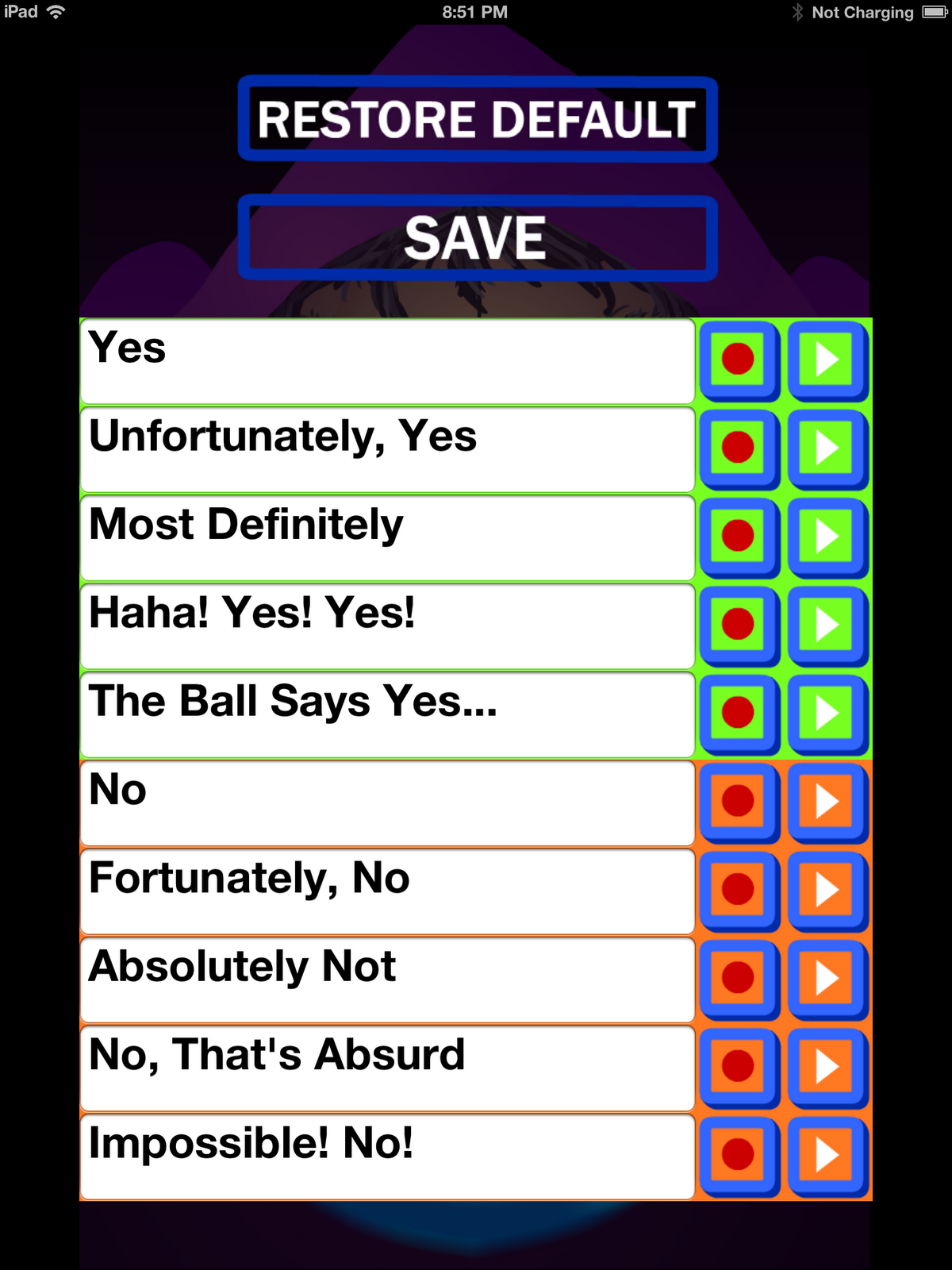
That update is a neat, new customization feature. It allows you to write and record your own answers for the Wizard's Magic Ball. If you're unhappy with what you've recorded, you can always restore the default voices (though, you have to save again if you want the default to stay on).
Also, if you look at the screenshot to the left, you'll probably notice the difference in color between the "yes" and "no" answers. This is to indicate which group the answers are in for rigging. If you rig for "no," you'll get an answer for the orange group, and if you rig for "yes," you'll get an answer from the green group.
Go try it!
Also, look for a couple of very special updates tomorrow....
*Sneak*

(Oh, side note: this is not yet released on Android. That will happen sometime soon...)
Sunday, March 4, 2012
Wizard's Magic Ball - Delivered!
UPDATE: My app is in the App Store as well.
It has taken long enough, but I finally got an app delivered.

It turns out that even the smallest of apps is a ton of work. Even this one, which was made with the use of the wonderful Corona SDK.
If you're interested in developing for iOS or Android and don't have the time, energy, or money to get up to speed with both Objective-C and Java, I highly recommend Corona. Best of all, it's free to try out, so what are you waiting for?
That being said, I learned quite a bit in getting this little app to market:
1) Windows may not care about file name capitalization, but every other OS does, so if you're developing on Windows, do yourself a favor and pick a simple strategy for naming files (like keeping them all lowercase) and stick to it. I spent several hours trying to figure out why my app wouldn't work on my tablet, only to trace it down to a reference to "LevelEditor" when the file name was "levelEditor."
2) Multiple X-Code installs will likely cause a headache when attempting to deploy to your iOS device. This site was instrumental in getting my system setup to deploy Corona apps:
http://pushkararora.com/how-
3) For current Corona users, you need the following: X-Code 4.2 (4.3 is currently not working with Corona because of some of Apple's changes), and the current Application Loader. Application Loader can be found on iTunesConnect, a site you will probably never have heard of, if you haven't done any iOS development before. Also, it's almost impossible to find (go to Manage Applications, then look at the bottom under Application Loader). The easiest way to get up to speed is to uninstall all X-Code installs, restart your system, install X-Code 4.2, restart your system, install the latest Application Loader, restart your system, and proceed from there.
4) Apple must use stagecoaches to deliver your app to the reviewers. Also, their process for signing apps must have been borrowed from the Dead Sea scrolls. For reference, it took me about an hour to get my app on the Android and Amazon market places. It also cost me $25 (that was for the Android market, Amazon costs $99 a year, but they're waving the first year). To get it on the Apple Store took me an entire day and $99. Also, it's still not out yet. I have to wait at least a week for them to accept my contract so that I can sell apps and at least a week for them to review my app (as of right now, the app has still not been picked up for review). Be forewarned. If you have any sort of deadline, get your Apple accounts squared away before starting on your app.
5) Corona is awesome, but there are some things to be aware of, most notably: test on as many devices as you can because the resolution will be an issue. Corona comes with some neat scaling features, but while that works well for scaling big images to the right size, it doesn't help out so much with positioning of game elements. I wrote a utility class for take the device's resolution and using that to scale all my elements and positions to the right places. NOTE: Corona auto-scales assets if they won't fit in texture memory. That means that, with my code, I had to make a special case to deal with assets that might run afoul of the texture memory limits on some devices (basically, anything over 1024x1024).
6) Make sure that you make a vector version of some of your screens and your app icon because you'll need a set of screens and icons in a myriad of sizes for each market place.
7) Asus Transformers often have a power button issue that comes from the outer button not lining up with the physical one inside. I'm still trying to get mine fixed, but be forewarned if you're thinking about picking one up for running your apps.
8) Getting an app onto the market places where people can buy it and play it is an awesome feeling. I recommend everyone try it out.
It has taken long enough, but I finally got an app delivered.
(click the image to go to Android market)
If you're interested in developing for iOS or Android and don't have the time, energy, or money to get up to speed with both Objective-C and Java, I highly recommend Corona. Best of all, it's free to try out, so what are you waiting for?
That being said, I learned quite a bit in getting this little app to market:
1) Windows may not care about file name capitalization, but every other OS does, so if you're developing on Windows, do yourself a favor and pick a simple strategy for naming files (like keeping them all lowercase) and stick to it. I spent several hours trying to figure out why my app wouldn't work on my tablet, only to trace it down to a reference to "LevelEditor" when the file name was "levelEditor."
2) Multiple X-Code installs will likely cause a headache when attempting to deploy to your iOS device. This site was instrumental in getting my system setup to deploy Corona apps:
http://pushkararora.com/how-
3) For current Corona users, you need the following: X-Code 4.2 (4.3 is currently not working with Corona because of some of Apple's changes), and the current Application Loader. Application Loader can be found on iTunesConnect, a site you will probably never have heard of, if you haven't done any iOS development before. Also, it's almost impossible to find (go to Manage Applications, then look at the bottom under Application Loader). The easiest way to get up to speed is to uninstall all X-Code installs, restart your system, install X-Code 4.2, restart your system, install the latest Application Loader, restart your system, and proceed from there.
4) Apple must use stagecoaches to deliver your app to the reviewers. Also, their process for signing apps must have been borrowed from the Dead Sea scrolls. For reference, it took me about an hour to get my app on the Android and Amazon market places. It also cost me $25 (that was for the Android market, Amazon costs $99 a year, but they're waving the first year). To get it on the Apple Store took me an entire day and $99. Also, it's still not out yet. I have to wait at least a week for them to accept my contract so that I can sell apps and at least a week for them to review my app (as of right now, the app has still not been picked up for review). Be forewarned. If you have any sort of deadline, get your Apple accounts squared away before starting on your app.
5) Corona is awesome, but there are some things to be aware of, most notably: test on as many devices as you can because the resolution will be an issue. Corona comes with some neat scaling features, but while that works well for scaling big images to the right size, it doesn't help out so much with positioning of game elements. I wrote a utility class for take the device's resolution and using that to scale all my elements and positions to the right places. NOTE: Corona auto-scales assets if they won't fit in texture memory. That means that, with my code, I had to make a special case to deal with assets that might run afoul of the texture memory limits on some devices (basically, anything over 1024x1024).
6) Make sure that you make a vector version of some of your screens and your app icon because you'll need a set of screens and icons in a myriad of sizes for each market place.
7) Asus Transformers often have a power button issue that comes from the outer button not lining up with the physical one inside. I'm still trying to get mine fixed, but be forewarned if you're thinking about picking one up for running your apps.
8) Getting an app onto the market places where people can buy it and play it is an awesome feeling. I recommend everyone try it out.
Saturday, February 11, 2012
Back to work!
Alright, it's been a long time, but I'm going to get back to working on my goals and blogging about it.
But First!
I'm actually busy working on an app, so I'm just going to drop some knowledge before I forget. I got a new Asus, and it's pretty rad, but it has this dumb problem of auto-hiding my task bar in Windows 7 every time it goes to sleep, it restarts, or I plug/unplug the power.
To fix this, do the following:
-navigate to Control Panel\Hardware and Sound\Power Options
-there you'll see your selected power option
-click "change plan settings" next to it
-click "change advanced power settings" towards the bottom
-here you'll find all kinds of useful features you can turn on and off dependent on the current mode
-find "ASUS P4G Power Setting"
-find "Battery Saving Desktop"
-disable it when you're plugged in or on battery
Unfortunately, there are a bunch of clever things this does to squeeze a little more life out of your battery (like turning off many of the Windows 7 effects), but I HATE auto-hiding the task bar. Although, if you want to save power AND show your task bar, you could always manually turn off all the Windows 7 effects that this power settings changes.
And there you have it. I'll be posting about my current projects soon. Now, back to work.
But First!
I'm actually busy working on an app, so I'm just going to drop some knowledge before I forget. I got a new Asus, and it's pretty rad, but it has this dumb problem of auto-hiding my task bar in Windows 7 every time it goes to sleep, it restarts, or I plug/unplug the power.
To fix this, do the following:
-navigate to Control Panel\Hardware and Sound\Power Options
-there you'll see your selected power option
-click "change plan settings" next to it
-click "change advanced power settings" towards the bottom
-here you'll find all kinds of useful features you can turn on and off dependent on the current mode
-find "ASUS P4G Power Setting"
-find "Battery Saving Desktop"
-disable it when you're plugged in or on battery
Unfortunately, there are a bunch of clever things this does to squeeze a little more life out of your battery (like turning off many of the Windows 7 effects), but I HATE auto-hiding the task bar. Although, if you want to save power AND show your task bar, you could always manually turn off all the Windows 7 effects that this power settings changes.
And there you have it. I'll be posting about my current projects soon. Now, back to work.
Tuesday, August 2, 2011
Android Game Development, Step 1:
Go here: http://www.javacodegeeks.com/2011/06/android-game-development-tutorials.html
In all the languages I've dabbled in and all the tutorials I've found on the internet, this is the first tutorial that I've found that covers everything you want to know without all the other junk. It's quick, it's simple, and it gives you all you need to start on a path to game development on the droid.
I challenge anyone to find a better tutorial.
In all the languages I've dabbled in and all the tutorials I've found on the internet, this is the first tutorial that I've found that covers everything you want to know without all the other junk. It's quick, it's simple, and it gives you all you need to start on a path to game development on the droid.
I challenge anyone to find a better tutorial.
Thursday, July 28, 2011
How to get Ruby on Rails running on Android with a sqlite database with zero knowledge of rails, Android, and sqlite
My previous post about getting Rails running was really only a pit-stop on the way to my real goal of getting my Android tablet to talk to a Rails server.
That's what I searched for first, which led me to the instructions for installing Rails on PC. So, to back up, I was looking for "Android and Ruby on Rails," and I got this post:
Which of course, references the other Google top search which is this:
So after figuring out how to get a Rails server running on PC (documented in my previous post), I decided to start with Gertig's demo project for Android (downloadable at the top of the link above).
Unfortunately, that did not work out of the box. Mainly because he only provides the source for the Droid app, not the Rails. So I jumped over to Michael Maitlen's blog (mgmblog link above) which Gertig referenced and took a look at his httpclient hello world, hoping that it would show me the Rails side of things.
Knowing nothing about Rails or Ruby(except what I gleaned from setting it up in my previous post), it took me a bit to puzzle through Maitlen's code and to realize that the commands he's using won't work if you've followed Gertig's instructions for setting up Rails on PC. If you have, here's what you need to do to create a Rails project for Gertig's demo Android project (note, I made changes to Gertig's demo, keep reading to find out what):
- DroidRails is the name of my project -
- Start Command Prompt with Ruby
- cd to your RailsApp folder
- code:>rails new DroidRails>cd DroidRails>rake db:create>rails generate scaffold events name:string budget:string>rake db:migrate[next, I did this in a new ruby cmd prompt, but you shouldn't have to]>rails server
Alright, I still know next to nothing about Rails, but from what I gathered, the above code creates a Rails project with a sqlite3 server (from when I setup Rails), adds a template (scaffolding?) for a SQL object called "events" with the entries "name" and "budget" which are both strings, and starts said server. From there, I can contact it with Gertig's demo Droid app.
Now, for the changes I made to Gertig's project to get it to work (this is required if you're going to create a server like I instructed, but I'm sure after reading, you'll be able to tell how to write a server to fit Gertig's project 100%):
- in AddEventView#postEvents()
- set the HttpPost to your local ip (note: my ip did not match Gertig's comments)
- change "budget" into a string and access just like "name" (I did this for simplicity's sake, I didn't want to worry about data types on the Rails or Droid to start)
- change "myevent" on line 85 to "event"
- in RubyMain#retreiveProjects()
- change the string url on line 68 to your ip (match HttpPost above)
- in RubyMain#parseXMLString()
- on line 136, change “myevent” to “event” for the nodes
- change “budget” to a string, update the set on line 153 to get a string like “name” does
Troubleshooting:
The three most likely culprits of any problem are 1) your Rails project isn't setup correctly, 2) your Droid project doesn't match your Rails project, and 3) your ip is incorrect.
If you followed my instructions above, 1 and 2 should not be a problem. If not, here's the main issues I ran into:
For 1:
- If you follow Gertig's Rails setup blog (which I followed in my previous post), and you try to build the Rails app by following Maitlen's instructions, you're doomed to fail.
- I found this site: http://guides.rubyonrails.org/getting_started.html helpful in figuring out how a Rails server should be built, and I compared the commands in it with Maitlen's to figure out what I needed to do.
For 2:
- If you followed my instructions for 1, then you'll need to follow all of them. In my Rails server, I changed “budget” to a string to further simplify the app. I also changed the name of “myevent” for no good reason.
- If you change the names, Rails does some interesting stuff automatically. To get my project working, I actually had to use Firebug to analyze the call made by the Rails test page that's generated for you (http://localhost:3000/events) in order to see what was being posted when I made a new event. Working backwards from that, I figured out how to alter Gertig's project to match. If something's not working, that's where I would start looking.[Note: one of the weirdest things here is that I used “events” in my server, but Rails used the singular form for creating a new “event.” It seems to have done this automatically.]
- Also, you need the right IP. Localhost works from your PC but doesn't from the Droid (because localhost on the Droid would refer to a server that it's running on itself). I cover the details of this below:
For 3, do the following:
- go to http://localhost:3000/
- make sure it shows the “Welcome aboard” Rails page. If it doesn't, your server isn't running.
- open a command prompt and type ipconfig, hit enter
- look at the list of IPs towards the top around “Default Gateway.” The one that worked for me was the “IPv4 address”
- go to http://[your IP address]:3000/
- make sure it also shows the Rails welcome page. If it doesn't, you've got the wrong IP address.
- Once you find the right one, add it to your Droid project.
Wednesday, July 27, 2011
How to get Ruby on Rails running on a PC with zero prior knowledge!
I know next to nothing about Ruby or Rails, so of course, I'm beginning by following tutorials on the internet. A couple months ago, I went to http://www.ruby-lang.org/en/ and did the super intro tutorial at http://tryruby.org/. If I don't get too distracted with attempting to get Android and Rails talking, I think I'll go through the other tutorials referenced on the ruby-lang site. More on that if I return to them.


And that's it. Gertig's instructions totally worked. Now, it's time to follow his tutorial to link Ruby on Rails and Android.
(Note: I've almost got Android and Rails talking, but I left my cable at work, so I can't test the last change, meaning my post on it will go up tomorrow when I'm sure it works.)
Beginning here:
Notes:
- There's now a selection in the installer for Td/Tk which has something to do with GUI building in Ruby... more on that later if it becomes important. (spoiler: it doesn't)
- I'm running Vista, so when I start the gem server, I get confirmation dialogues by the dozen. Good times.
- I just installed Ruby for the first time, so I've only got these gems installed: minitest, rake, rdoc, rubygems.
- If you follow the instructions to a T, you'll see the following dialogue noting that sqlite3-ruby has changed names.
- Though, it no longer tells you to add the .dll to your bin folder, I figured it couldn't hurt, so I added the latest dll to my C:\Ruby192\bin folder. I got the latest by going to the download page and selecting the only one I saw.
- I installed rails per the instructions, and I got this sweet error(it says generating docs, so hopefully, this isn't important... :/ ):
- At this point, I would like to note that Rails (or I guess I should say Ruby) scares me. I've just typed a few commands, and some super complex stuff has been taken care of for me (or at least that's what I'm guessing based on what I've read and what I'm seeing happen). This is awesome, exactly what I've always wanted, but it makes me nervous. Didn't someone say something about being careful what you wish for?
And that's it. Gertig's instructions totally worked. Now, it's time to follow his tutorial to link Ruby on Rails and Android.
(Note: I've almost got Android and Rails talking, but I left my cable at work, so I can't test the last change, meaning my post on it will go up tomorrow when I'm sure it works.)
Tuesday, July 26, 2011
How to remove a payment method on Xbox Live
Wow, I've only been annoyed by this for a year. Finally, I stumbled upon it when canceling my App Hub service for launching XNA apps on the 360. :(
Here's how to remove an old payment method (read: expired credit card) from Xbox Live. Why they made this so difficult to find is beyond me:
http://support.xbox.com/en-us/pages/xbox-live/how-to/xbox-live-account-management/default.aspx
Oh, and about getting rid of my XNA service. It feels like giving up, but really, I can still develop for it. I just can't deploy to the 360. But after a couple of years of barely using it, I'm ready to stop giving Microsoft my money.
I realize now that I was disenchanted by how Xbox Live Indie games never really took off. I guess they still could, but it's been a long time, and the next Xbox console is likely looming over the horizon. I hope they continue the initiative, but they need an overhaul. They need a marketplace akin to that of Apple's App Store. People need to be told what to buy and given ways to pass it on to friends.
It's funny, my work may never be seen on Android either, but at least on Android I feel like it could be seen.
Here's how to remove an old payment method (read: expired credit card) from Xbox Live. Why they made this so difficult to find is beyond me:
http://support.xbox.com/en-us/pages/xbox-live/how-to/xbox-live-account-management/default.aspx
Oh, and about getting rid of my XNA service. It feels like giving up, but really, I can still develop for it. I just can't deploy to the 360. But after a couple of years of barely using it, I'm ready to stop giving Microsoft my money.
I realize now that I was disenchanted by how Xbox Live Indie games never really took off. I guess they still could, but it's been a long time, and the next Xbox console is likely looming over the horizon. I hope they continue the initiative, but they need an overhaul. They need a marketplace akin to that of Apple's App Store. People need to be told what to buy and given ways to pass it on to friends.
It's funny, my work may never be seen on Android either, but at least on Android I feel like it could be seen.
Alright, time to get to work.
So, as I usually do, I'm juggling about a million projects. They are as follows:
-learning enough Android programming to make games and a magazine for my Asus Transformer tablet
-creating content for aforementioned magazine (this includes fiction writing, reviews, music, video, games, art, pictures, design, etc.)
-learning Ruby on Rails because it would be useful at work
-picking up new activities (I'm going to try out lacrosse this weekend if all goes as planned)
-moving to minimalist footwear
-and all those things I've mentioned previously...
My plan here, though, is to share my knowledge. And that's just what I'm going to do. So, when I'm not doing one of the above things or getting sucked into episodes of Dr. Who and Torchwood, I'm going to document what I'm doing to accomplish these tasks.
First, a quick tip for would be Android tablet programmers. Tablets are running Android 3.0 (Honeycomb), API level 11 and up. If you're jumping right into Android programming for the first time, you'll probably glaze over the whole API level thing. What you'll miss in doing so is that, if you don't set your MINIMUM API level to 11 or above, you resultant project will not support a tablet's resolution. So, despite having your target at the latest Honeycomb release, you'll get a nifty little app with a view the size of an Android phone, leaving the rest of your monstrous tablet blank.
Alright, back to programming. Hopefully, I'll have some cool info in the near future. Also, I plan on adding links for all the nifty stuff I find in the future (I lost the link that explained the aforementioned tip).
Anyway, if you're reading this, I hope you too are doing something awesome. If so, you should share.
-learning enough Android programming to make games and a magazine for my Asus Transformer tablet
-creating content for aforementioned magazine (this includes fiction writing, reviews, music, video, games, art, pictures, design, etc.)
-learning Ruby on Rails because it would be useful at work
-picking up new activities (I'm going to try out lacrosse this weekend if all goes as planned)
-moving to minimalist footwear
-and all those things I've mentioned previously...
My plan here, though, is to share my knowledge. And that's just what I'm going to do. So, when I'm not doing one of the above things or getting sucked into episodes of Dr. Who and Torchwood, I'm going to document what I'm doing to accomplish these tasks.
First, a quick tip for would be Android tablet programmers. Tablets are running Android 3.0 (Honeycomb), API level 11 and up. If you're jumping right into Android programming for the first time, you'll probably glaze over the whole API level thing. What you'll miss in doing so is that, if you don't set your MINIMUM API level to 11 or above, you resultant project will not support a tablet's resolution. So, despite having your target at the latest Honeycomb release, you'll get a nifty little app with a view the size of an Android phone, leaving the rest of your monstrous tablet blank.
Alright, back to programming. Hopefully, I'll have some cool info in the near future. Also, I plan on adding links for all the nifty stuff I find in the future (I lost the link that explained the aforementioned tip).
Anyway, if you're reading this, I hope you too are doing something awesome. If so, you should share.
Sunday, June 26, 2011
Times are a Changin'
Since I moved across the country, gave away my guitars, and took up Android programming, I decided to change the focus of this here blog.
Instead of chronicling my endeavors to accomplish my New Year's resolutions, it's going to be a blog about whatever the hell I want to blog about. I'm still working on those resolutions, but I'm altering them. Currently, I'm getting into Android development for my sweet new Asus Transformer. So I'll still be trying to make games, but I'm also working on a digital magazine with my good friend from 2-thirds.
He and I are also doing comics, and I'm still trying to learn Japanese. I seem to make a ton of progress, then stop for a week or two, then pick it back up again. Learning is hard. :P
Anyway, if you're interested, updates will come this way.
Instead of chronicling my endeavors to accomplish my New Year's resolutions, it's going to be a blog about whatever the hell I want to blog about. I'm still working on those resolutions, but I'm altering them. Currently, I'm getting into Android development for my sweet new Asus Transformer. So I'll still be trying to make games, but I'm also working on a digital magazine with my good friend from 2-thirds.
He and I are also doing comics, and I'm still trying to learn Japanese. I seem to make a ton of progress, then stop for a week or two, then pick it back up again. Learning is hard. :P
Anyway, if you're interested, updates will come this way.
Saturday, February 26, 2011
Life is like a roller coaster
It does flips and throws you over
Board your ship that's going nowhere
If you stop, you'll end up somewhere
I can finally talk about what's been keeping me from blogging/guitaring/pianoing/Japanesing/programming. I've been applying for new jobs and have taken one in Arlington, VA. Obviously, this has interrupted my other goals for this year, but once I move (across the flippin' country), hopefully I'll have some time to sit down and work on my hobbies.
In the meantime, I've been squeezing them in when I can, and I realized that I have a really great camera that can record really well, so maybe I'll get a YouTube account and start making an ass out of myself on there. At least then, I can post what I'm doing, instead of just text about it. Could be cool. We'll see.
In other news, my bestest friend ever, Joaquin, has started an interesting new site for sharing his various works in progress. Cleverly named 2/3rds, after the completeness of the work he'll be showing there, his site will be home to all manner of creative things. He and I just started kicking around the idea of some collaborations, so I may send some music, art, or writing his way, which I will then pimp here.
I'm excited about his site because I've been wanting to see other people's creative work, from which I might draw inspiration. We'll see how it goes. For now, I better get back to packing.
Board your ship that's going nowhere
If you stop, you'll end up somewhere
I can finally talk about what's been keeping me from blogging/guitaring/pianoing/Japanesing/programming. I've been applying for new jobs and have taken one in Arlington, VA. Obviously, this has interrupted my other goals for this year, but once I move (across the flippin' country), hopefully I'll have some time to sit down and work on my hobbies.
In the meantime, I've been squeezing them in when I can, and I realized that I have a really great camera that can record really well, so maybe I'll get a YouTube account and start making an ass out of myself on there. At least then, I can post what I'm doing, instead of just text about it. Could be cool. We'll see.
In other news, my bestest friend ever, Joaquin, has started an interesting new site for sharing his various works in progress. Cleverly named 2/3rds, after the completeness of the work he'll be showing there, his site will be home to all manner of creative things. He and I just started kicking around the idea of some collaborations, so I may send some music, art, or writing his way, which I will then pimp here.
I'm excited about his site because I've been wanting to see other people's creative work, from which I might draw inspiration. We'll see how it goes. For now, I better get back to packing.
Wednesday, February 2, 2011
Now I see you fell asleep again...
You've been riding this train since 2AM
Like the circle of fifths you drew in school
The loop line takes round and through
I wish I could fall asleep. I haven't been sleeping well lately. Going to bed super late, waking up super early, waking up again sort of early, and finally, waking up late and going to work.
I've been super busy lately. I've still been finding time to get my stuff done though. I've made some major progress on Japanese. I spent my weekend working on it. Also, I've made the first round of attempts at finding someone with whom to study. Having someone who's also learning Japanese, or preferably a Japanese speaker who's learning English, would do a great deal to motivate and help me.
We'll see.
The rest of my time has been spent programming and investigating programming. I'm compiling a list of things I need to learn and resources from which I may learn them. There are many gaps in my knowledge that need filling. In the meantime, I'm trying to piece my various experiments into actual games. I've got to start writing if I'm going to get them done this year....
And all this time, my guitar sits in the corner crying (or gently weeping as the song goes). Don't get me started on the piano. About all I've done is screw around with it for a couple days.
So, time for a round up...
MONTH ONE: COMPLETE
Japanese - 3/4 of the way through Level 1 of 3
This is pretty great when you look at how much time is left, but terrible when you consider most of that progress was done last year. :/
Guitar - Learned a bunch of easy songs (none of the ones from my books though)
I made a ton of progress on the guitar. I need to focus on my goals (one song a month from my chords books) though, in order to better measure my progress. Still, I think I'm doing fine on this one.
Programming - lots of exploration, but only some code snippets to show for it
Again, I'm looking at my written goals and realizing I need to be making my way through the programming books I've got, and I need to be busting out some games (one a month again...). I think this weekend will be spent trying to make the fastest, simplest game I've ever made in my life. Start to finish. At least then I'll have a base from which to work.
Piano - zilch
Alright, obviously, this took a backseat this month. Next month though, it'll be time to hit the books. I need to just incorporate it into my routine. I'll get there....
Beyond that, I still need to check out Improv classes and get in better shape (two goals I haven't included because they don't really have trackable progress that I can share here). I've got the "getting into shape" part down though. I've been playing dodgeball and dancing my way through Dance Central.
My Grade: Not Bad
Not great, but not bad. Time to redouble my efforts and get going this next month.
How's everyone out there in internet land doing? Has your first month of the year been productive?
Like the circle of fifths you drew in school
The loop line takes round and through
I wish I could fall asleep. I haven't been sleeping well lately. Going to bed super late, waking up super early, waking up again sort of early, and finally, waking up late and going to work.
I've been super busy lately. I've still been finding time to get my stuff done though. I've made some major progress on Japanese. I spent my weekend working on it. Also, I've made the first round of attempts at finding someone with whom to study. Having someone who's also learning Japanese, or preferably a Japanese speaker who's learning English, would do a great deal to motivate and help me.
We'll see.
The rest of my time has been spent programming and investigating programming. I'm compiling a list of things I need to learn and resources from which I may learn them. There are many gaps in my knowledge that need filling. In the meantime, I'm trying to piece my various experiments into actual games. I've got to start writing if I'm going to get them done this year....
And all this time, my guitar sits in the corner crying (or gently weeping as the song goes). Don't get me started on the piano. About all I've done is screw around with it for a couple days.
So, time for a round up...
MONTH ONE: COMPLETE
Japanese - 3/4 of the way through Level 1 of 3
This is pretty great when you look at how much time is left, but terrible when you consider most of that progress was done last year. :/
Guitar - Learned a bunch of easy songs (none of the ones from my books though)
I made a ton of progress on the guitar. I need to focus on my goals (one song a month from my chords books) though, in order to better measure my progress. Still, I think I'm doing fine on this one.
Programming - lots of exploration, but only some code snippets to show for it
Again, I'm looking at my written goals and realizing I need to be making my way through the programming books I've got, and I need to be busting out some games (one a month again...). I think this weekend will be spent trying to make the fastest, simplest game I've ever made in my life. Start to finish. At least then I'll have a base from which to work.
Piano - zilch
Alright, obviously, this took a backseat this month. Next month though, it'll be time to hit the books. I need to just incorporate it into my routine. I'll get there....
Beyond that, I still need to check out Improv classes and get in better shape (two goals I haven't included because they don't really have trackable progress that I can share here). I've got the "getting into shape" part down though. I've been playing dodgeball and dancing my way through Dance Central.
My Grade: Not Bad
Not great, but not bad. Time to redouble my efforts and get going this next month.
How's everyone out there in internet land doing? Has your first month of the year been productive?
Friday, January 21, 2011
It all keeps adding up, I think I'm cracking up...
Informally, I'm attempting to update this at least once a week. Reminding myself that I need to post a blog reminds me that I need to be doing the things that I would be posting a blog about. It seems, however, that as soon as you set goals, the universe goes about conspiring to keep you from completing them. Thus, in my attempts to fight it, I am up now, at 4a.m., studying Japanese and writing a blog.
おはようございます!
わたしはblogをかいています。
I wish someone who can read Japanese was reading my blog so that they could correct me if I'm wrong.
Anyway, this week has been good for programming, not so good for everything else. I'm learning a lot about the languages in which I make games but not making games. I need to get on that if I'm going to get done what I hope to this year. That being said tomorrow (today) is a hack day at work, so making a game there counts, right?
Hopefully, this is just me being slow to start, and I'll ramp up shortly. I need to be studying Japanese every single day because every time I have a short break, I feel like I'm losing something. It makes me think I should do every thing (piano, guitar, Japanese, programming) once a day, but that's not really plausible. I would spend more time switching activities and setting them up than I would actually doing any learning.
I guess that's the hardest part. I've committed to doing these things, and I've set aside the time to do them. Now, I just need to get over the fact that I'm not going to progress at all of them everyday. I have a year to accomplish these goals. I just need to pace myself.
Oh, and stop procrasting (Jake and Amir say "Hello").
おはようございます!
わたしはblogをかいています。
I wish someone who can read Japanese was reading my blog so that they could correct me if I'm wrong.
Anyway, this week has been good for programming, not so good for everything else. I'm learning a lot about the languages in which I make games but not making games. I need to get on that if I'm going to get done what I hope to this year. That being said tomorrow (today) is a hack day at work, so making a game there counts, right?
Hopefully, this is just me being slow to start, and I'll ramp up shortly. I need to be studying Japanese every single day because every time I have a short break, I feel like I'm losing something. It makes me think I should do every thing (piano, guitar, Japanese, programming) once a day, but that's not really plausible. I would spend more time switching activities and setting them up than I would actually doing any learning.
I guess that's the hardest part. I've committed to doing these things, and I've set aside the time to do them. Now, I just need to get over the fact that I'm not going to progress at all of them everyday. I have a year to accomplish these goals. I just need to pace myself.
Oh, and stop procrasting (Jake and Amir say "Hello").
Saturday, January 8, 2011
I know I'm gonna be...
I'm gonna be the man who accomplishes all my goals...
Sorry, I've got the Proclaimers running through my head.
I learned it on the guitar because it's stupid easy, and it's fun attempting to imitate their voices (accents and all).
I've also been trying to learn about writing music and was reminded of one of my favorite videos by this site. That inspired me to learn the chords from Pachelbell's Canon in D Major, which is awesome because it reminds me of many great songs, and it's helping me with my transitions in and out of barre chords.
I have realized, however, that the guitar has an unfair advantage when it comes to hobbies I'm pursuing. It is by far the easiest to pick up and practice, requiring almost no preparation, and it's always in my sight because there are two sitting in my room. Also, music strikes a chord (PUN!) that all my other hobbies don't. If I'm not careful, I'll spend the entire year playing guitar and think at the end, "now, wasn't there something else I meant to do?"
That's why, as soon as I'm done typing this, I'm going to jump into some programming (after strumming a few notes of course...).
Sorry, I've got the Proclaimers running through my head.
I learned it on the guitar because it's stupid easy, and it's fun attempting to imitate their voices (accents and all).
I've also been trying to learn about writing music and was reminded of one of my favorite videos by this site. That inspired me to learn the chords from Pachelbell's Canon in D Major, which is awesome because it reminds me of many great songs, and it's helping me with my transitions in and out of barre chords.
I have realized, however, that the guitar has an unfair advantage when it comes to hobbies I'm pursuing. It is by far the easiest to pick up and practice, requiring almost no preparation, and it's always in my sight because there are two sitting in my room. Also, music strikes a chord (PUN!) that all my other hobbies don't. If I'm not careful, I'll spend the entire year playing guitar and think at the end, "now, wasn't there something else I meant to do?"
That's why, as soon as I'm done typing this, I'm going to jump into some programming (after strumming a few notes of course...).
Sunday, January 2, 2011
The Best Around
There's a classic song, stop me if you've heard it. It goes:
I want to be the very best,
like no one ever was....
To catch them is my real test,
to train them is my cause!
Pokemon!
It was a great song for a great show about a great game. And it never fails to inspire the kid in me to dream big, and that's what I'm doing now.
My dream is to do four things: play the guitar really well, play the piano really well, speak Japanese really well, and make great games.
And that brings me to this page. My hope is that maintaining this blog will keep me honest. It will also be an outlet for me to display my progress, so that I don't get annoyed with toiling away in obscurity (even though I know no one is likely to read this, at least I'll feel like someone could be).
I also plan on posting my various problems (and hopefully solutions), so that those on similar journeys will know that they're not alone.
So let's begin...
Come with me the time is right,
There's no better team.
Arm in arm, we'll win the fight,
It's always been our dream!
I want to be the very best,
like no one ever was....
To catch them is my real test,
to train them is my cause!
Pokemon!
It was a great song for a great show about a great game. And it never fails to inspire the kid in me to dream big, and that's what I'm doing now.
My dream is to do four things: play the guitar really well, play the piano really well, speak Japanese really well, and make great games.
And that brings me to this page. My hope is that maintaining this blog will keep me honest. It will also be an outlet for me to display my progress, so that I don't get annoyed with toiling away in obscurity (even though I know no one is likely to read this, at least I'll feel like someone could be).
I also plan on posting my various problems (and hopefully solutions), so that those on similar journeys will know that they're not alone.
So let's begin...
Come with me the time is right,
There's no better team.
Arm in arm, we'll win the fight,
It's always been our dream!
Subscribe to:
Posts (Atom)